
Control CLI
This is the reference for the rozi commands that inspect and drive a running rozi: listing panes, typing into them, reading their output, rearranging the layout, and showing pickers and toasts. It is for anyone writing shell scripts, hooks, services, or extensions. For a gentler start, read Scripting; to write a client that speaks the wire format directly, see Control protocol.
rozi list-panes                                   # the panes in the rozi you are running
rozi split --title Tests --argv cargo test        # open a pane running a program
rozi --session dev capture-pane --target 3        # read a pane in a session nobody is viewing
Two endpoints
A control command talks to one of two places, called its endpoint:
- A running UI — the rozi window you are looking at. It can do everything, including moving focus and drawing pickers and toasts.
- A named session server — the background process that keeps a session's panes alive (see Sessions and clients). Select it with
--session <NAME>. It needs no window at all, so a detached session can be listed, captured, typed into, and given new panes from a cron job or an SSH login.
| Endpoint | Selected by | Serves |
|---|---|---|
| A running UI | --socket, ROZI_SOCKET, or discovery | Every command. |
| A named session server | --session <NAME> | The commands a server can answer without a screen. |
rozi --session dev list-panes
rozi --session dev capture-pane --target 3
rozi --session dev send-keys --target 3 'cargo test' Enter
rozi --session dev split --workspace 9 --argv cargo watch -x test
Both endpoints return the same {ok, code, data, error} document and the same tables, so a script reads one format either way. code appears on failures and is stable for automation.
A session endpoint gives a script no authority an attached client would not have. Opening a pane still needs layout control to be free (only one client at a time holds it; see Shared sessions), typing still respects the session's input lock, and a request made on behalf of an extension is refused (see Extensions and detached sessions).
The commands marked no in the command table need a UI. Against a session they fail with a message saying why: focus, the active workspace, toasts, pickers, actions, and capture-ui belong to a UI, and a session server has no screen.
--session and --socket name different endpoints and cannot be combined. A bare session name is a launch target, not a control target: rozi dev starts a UI, so rozi dev list-panes is refused and suggests --session dev instead.
Sessions on another machine
Add --remote <HOST> to reach a named session on another machine:
rozi --remote workbox --session dev list-panes
rozi --remote workbox --session dev agents prompt --target 3 --wait idle "run the tests"
Every command a local session answers, a remote one answers the same way, with the same output and the same exit status. The request is forwarded over SSH and the answer is rendered locally, so a remote command in a terminal prints the same table a local one does.
It uses the same SSH connection as remote attach: saved hosts, connection multiplexing, the discovered remote binary, and the same askpass rules. There is no daemon, network port, or account. --remote without --session is refused, because a control command addresses a session server and the far host's UI is not one.
agents wait and agents prompt --wait run on the remote session server and keep their own deadline; the SSH hop does not cut them short.
The remote host needs a rozi that supports forwarding. An older one is reported as a version mismatch rather than a broken command. Run rozi api describe there and look for remote-control in its capabilities.
Endpoint discovery
Without --session, control commands choose a UI endpoint in this order:
--socket PATHROZI_SOCKET- The only live control endpoint in the runtime directory
Discovery fails if the runtime directory contains no live endpoints or more than one. Pass --socket when several UIs are running. Put --socket PATH before the command.
| Platform | Endpoint named by ROZI_SOCKET |
|---|---|
| Linux | Unix-domain socket under $XDG_RUNTIME_DIR/rozi, /run/user/<uid>/rozi, or a private per-user temporary directory |
| macOS | Unix-domain socket in rozi's private runtime directory |
| Windows | Discovery entry under %LOCALAPPDATA%\rozi\run for a current-user named pipe |
On Windows, pass the discovery-entry path to the CLI. Do not read the entry or construct a pipe name yourself.
Every local pane receives ROZI=1 and ROZI_PANE, plus ROZI_SOCKET and ROZI_BIN when control is available. A session pane also receives ROZI_SESSION_INSTANCE, an opaque id of the session server it runs in, so a UI holding several sessions can tell whose pane is asking. It is empty in a scratch or popup pane. Remote panes do not receive the local client's ROZI_SOCKET or ROZI_BIN, and neither does a pane opened by rozi --session <NAME> split, because there is no UI for them to name. Such a pane still reaches its own session with rozi --session <NAME>.
Target selection
Commands that accept --target use it first.
Against a UI endpoint, the CLI otherwise sends the calling pane's ROZI_PANE, and rozi falls back to the focused pane.
Against a session endpoint, ROZI_PANE is ignored. A pane id does not say which session it belongs to, so a script in pane 3 of work running rozi --session dev send-text … would otherwise type into pane 3 of dev. A session endpoint uses --target, or the only pane of a one-pane session, and otherwise fails with the ids to choose from:
session `dev` has 3 panes and no focused pane; pass --target (ids: 1, 2, 5)agents report and agents release always require --target with --session, even for a one-pane session.
A pane addressing its own session names itself:
rozi --session dev status working --target "$ROZI_PANE"Target a pane explicitly when a script drives a pane it created:
ROZI_CMD=${ROZI_BIN:-rozi}
pane=$("$ROZI_CMD" split --workspace 9 --argv bash | jq -r '.data.id')
"$ROZI_CMD" send-text --target "$pane" 'printf "ready\n"'
"$ROZI_CMD" send-keys --target "$pane" Enter
Input sent while a pane's process is starting is queued. Input to an exited or failed process is rejected.
Commands
The --session column says whether the command also works against a session server with no UI attached.
| Command | Purpose | --session |
|---|---|---|
list-panes [--format text|json] | List panes visible to this endpoint. | yes |
layout get [--workspace 1-9] [--format text|json] | Report workspaces and where each pane sits. | yes |
layout set --workspace 1-9 [<LAYOUT>] [--master-ratio R] [--if-revision N] | Set a workspace's tiling layout, its master share, or both. | yes |
pane set --target ID [--floating B] [--fullscreen B] [--rect X,Y,W,H | --rect-fraction X,Y,W,H] [--split-ratio R | --width-ratio R] [--if-revision N] | Float, tile, place, size, or fullscreen a pane. | yes |
pane move --target ID --workspace 1-9 [--if-revision N] | Move a pane to another workspace. | yes |
pane swap --target ID --with ID [--if-revision N] | Exchange two tiled panes. | yes |
pane close --target ID [--if-revision N] | Close a pane without asking. | yes |
pane reveal --target ID | Scroll a Scrollable strip to a pane without focusing it. | no |
agents list [--format text|json] | List effective agent runtimes and exact references. | yes |
agents get TARGET [--format text|json] | Read one semantic agent record. | yes |
agents read TARGET [--scrollback N|full] [--format text|json] | Capture an agent's terminal. | yes |
agents wait TARGET --until STATE [--timeout DURATION] [--format text|json] | Wait atomically for semantic state. | only |
agents prompt TARGET [--wait STATE] [--timeout DURATION] [--allow-working] [--format text|json] TEXT | Validate, submit, and optionally wait atomically. | only |
agents report --agent ID --integration TOKEN --state STATE --seq N [--reason TEXT] [--native-session ID] [--target ID] | Publish incarnation- and sequence-fenced native agent state. | yes |
agents release --integration TOKEN --seq N [--target ID] | Release integration authority. | yes |
metrics [--format text|json] | Read bounded client and cached server resource counters. | yes |
focus <PANE_ID> | Focus a pane. | no |
send-text [--target <PANE_ID>] [WAIT] [--capture text|ansi|png|spans] <TEXT> | Send literal UTF-8 text. | yes |
send-keys [--target <PANE_ID>] [-l|--literal] [WAIT] [--capture text|ansi|png|spans] [--] <KEY|TEXT>... | Send named keys and text. | yes |
split [OPTIONS] [COMMAND | --argv PROGRAM [ARG...]] | Open a pane. | yes |
run-action <ACTION_ID> | Run a built-in, configured, or extension command ID. | no |
capture-pane [--target ID] [--scrollback N|full] [--last-output] [--render text|ansi|png|spans] [--scale 1-3] [--image-pixels] [WAIT] [--output FILE] [--format text|json] | Capture a pane as text, ANSI, PNG, or styled runs. | yes |
capture-ui [--render text|ansi|png|spans] [--scale 1-3] [--image-pixels] [--output FILE] [--format text|json] | Capture the whole UI as it is drawn. | no |
record start [pane] [--target ID] [--output FILE [--force]] [--max-fps N] [--duration DUR] [--max-bytes SIZE] | Start recording a pane. | yes |
record pane --target ID [--output FILE] [OPTIONS] | Record a pane until Ctrl+C. | only |
record list [--format text|json] | List running recordings. | yes |
record mark TEXT [--id ID | --target ID] | Label the current moment of running recordings. | yes |
record stop [--id ID | --target ID] | Stop recordings once their files are complete. | yes |
record start ui [--output FILE [--force]] [--max-fps N] [--duration DUR] [--max-bytes SIZE] [--hide-indicator] | Record the UI as it paints, chrome included. | no |
record mark --ui TEXT | Label the current moment of the UI recording. | no |
record stop --ui | Stop the UI recording once its file is complete. | no |
record export FILE --to png-frames DIR [--scale 1-3] | --to cast OUT [--force] | Export a recording. | — |
record play FILE [--speed N] [--from MARK|TIME] | Replay a recording in this terminal. | — |
switch-workspace <1-9> | Switch the active workspace. | no |
move-to-workspace <1-9> | Move the focused pane. | no |
status [--target <PANE_ID>] <VALUE> [--reason TEXT] | Report status for a pane. | yes |
status --clear [--target <PANE_ID>] | Clear reported status. | yes |
notify <MESSAGE> [--title TEXT] [--level info|error] | Show a toast. | no |
subscribe [EVENT...] | Stream events as NDJSON. An empty list subscribes to all events. | no |
pick [--title TEXT] [--placeholder TEXT] [--json] | Open a modal picker using stdin and stdout. | no |
publish | Publish Activity rows over stdin and receive activations on stdout. | no |
api describe | Print the API versions and capabilities of the installed binary. | — |
layout set and the pane commands also accept --format text|json. WAIT is [--wait-for TEXT] [--settle DURATION] --timeout DURATION; see Wait for output.
In the agents rows, TARGET is --target ID (a pane id) or --ref JSON (an exact agent reference from agents list). agents wait and agents prompt run inside the session server, so they need --session and are refused against a UI. See Inspect and wait for agents for states, references, and integration reports.
The record commands that record run inside the session server. Against a UI, record start, stop, list, and mark are passed to the session it is attached to, and act on the pane the command runs in unless given --target or --id. record pane needs --session. record start ui, record mark --ui, and record stop --ui record the UI itself, which writes the file on its own machine. record export and record play read a file and take no endpoint. See Record a pane or the UI.
Control commands reject the launch-only options --config, --read-only, --profile, --pick, and --cwd. --session <NAME> is the one target they accept, optionally qualified by --remote <HOST>.
Check the installed API
rozi api describe prints the control API version, schema version, session protocol version, and capabilities of the installed binary. It does not connect to a UI or session:
{
  "api": 1,
  "schema": 14,
  "session_protocol": 21,
  "capabilities": [
    "agent-waits",
    "attached-control",
    "capture-render",
    "capture-scale",
    "capture-spans",
    "capture-ui",
    "capture-wait",
    "layout-control",
    "pane-control",
    "pane-reveal",
    "published-activity",
    "record-pane",
    "record-ui",
    "remote-control",
    "session-control",
    "split-size"
  ]
}
schema is the version of the JSON schema and changes independently of session_protocol, which only concerns how two rozi binaries talk to each other.
Output and exit status
list-panes, layout get, metrics, capture-pane, capture-ui, and record list print human-readable output to a terminal and stable JSON when redirected. Use --format text or --format json to choose explicitly.
Other successful one-shot commands print a short acknowledgement on a terminal and the JSON response when redirected. A failure prints its error to stderr; with JSON output, the failure document is also written to stdout.
| Exit status | Meaning |
|---|---|
0 | The command succeeded. |
1 | The command was invalid or refused, the reply had ok: false, a wait timed out, or a capture could not be written. |
2 | No endpoint was reached: discovery failed, the connection failed, the reply was empty or not JSON, or a PNG was about to be written to a terminal. |
pick has its own statuses; see Pickers.
list-panes describes only the endpoint that answered. From a UI, it includes the current attachment and client-local scratch panes, not every named session. From --session, it includes every pane in that session, including panes whose process has exited, which report exited (<CODE>) instead of ready. Use rozi sessions list to discover session servers.
Human-readable help and reports use rozi's palette when written to a terminal; redirected output stays plain. NO_COLOR, CLICOLOR=0, and TERM=dumb disable styling. CLICOLOR_FORCE enables it for a consumer that renders ANSI color from a pipe. JSON, publish and subscribe streams, and version output are never styled. The one-shot detach summary uses the same palette when rozi restores the terminal.
JSON schema
Every shape on this page is described by docs/schema/rozi-control-v1.schema.json: requests, the response envelope, error codes, each command's data payload, published activity rows, agent records and references, and the event envelope.
The schema is generated from the source, so it always matches the binary it ships with. Contributors regenerate it with:
cargo run --features schema-gen --bin rozi-api-schemaTwo conventions matter when you validate against it:
- Objects accept unknown properties. Responses gain fields over time, and a client validating against an older copy keeps working. Do not reject a document for carrying a field you do not recognize.
- Enumerations are closed. Error codes, agent states, wait conditions, and event names are fixed vocabularies. A new value is an API change and moves the schema version. The file name follows the control API version, so
rozi-control-v1.schema.jsonkeeps its name whilex-rozi-schema-versioncounts its revisions.
ControlResponse.data is untyped in the envelope, because one envelope carries every command's answer. The schema names each payload separately — PaneInfo, AgentInfo, PaneCapture, AgentWaitResult, and the rest — so pick the one for the command you sent.
Open a pane
split opens a pane. It leaves focus unchanged unless --focus is present.
| Option | Effect |
|---|---|
--cwd DIR | Start the pane in DIR. |
--title TEXT | Set the pane title. |
--workspace 1-9 | Open the pane in that workspace. |
--focus | Focus the new pane. |
--keep-open | Keep the pane after its process exits. |
--size COLSxROWS | Start the pane at this terminal size, 1 to 1000 cells per side. |
--argv PROGRAM [ARG...] | Run a program directly, without a shell. |
A positional COMMAND is interpreted by the configured command_shell. --argv launches a program directly and consumes all remaining arguments, so every pane option must come before it.
rozi split --cwd "/repo with spaces" --title Tests --keep-open 'cargo test'
rozi split --workspace 9 --focus --argv cargo test -- --nocapture
The reply waits up to five seconds for the pane's process to be ready. pty_ready: false means the pane exists but has not reported ready yet.
Choose the size of a pane
A pane takes the size of the tile a UI draws it in. A pane nobody is looking at — one in a workspace that is not on screen, or one in a detached session — has no tile, so it keeps the size it started at. Without --size, that is 120×32 in a UI, or the size of the session's other panes in a detached session.
--size sets that starting size, including sizes larger than any window, so a script can capture a program's whole screen at once:
pane=$(rozi split --workspace 9 --size 100x220 --argv my-tui | jq -r '.data.id')
rozi capture-pane --target "$pane" --settle 500ms --timeout 10s
The size holds until a UI draws the pane. Opening it in the workspace on screen, or switching to its workspace later, resizes it to its tile like any other pane.
A session server started by an older rozi refuses rozi --session <NAME> split with protocol-mismatch, so a sized pane never silently opens at the wrong size. A UI that is still running an older rozi does not know the field, and opens the pane at its default size; restart it after upgrading.
Open a pane in a detached session
With --session, the server places the pane itself, so a client attaching later finds it already in the layout. [[rules]] apply exactly as they do to a pane a person opens: a rule may float the pane, make it fullscreen, and choose its workspace, and an explicit --workspace still wins over the rule. Without either, the pane lands in workspace 1. The workspace's tiling arrangement is left alone: the new pane is tiled beside the others when a client draws it, and a split ratio you set survives.
[[rules]] and the configured shell are read from the server's config at the moment of the split, so an edited rule applies to the next one without restarting the session.
A session endpoint refuses split when:
- Another client holds layout control. Detach it, or open the pane from that client. Reading and typing do not need layout control and keep working.
--focusis given. There is no focus to move.- The session has panes but no layout. This happens only if no client ever attached to place them.
A pane opened this way receives only ROZI, ROZI_PANE, and ROZI_SESSION_INSTANCE. It does not get ROZI_SOCKET or ROZI_BIN, since there is no UI, and it does not inherit desktop variables such as DISPLAY, WAYLAND_DISPLAY, or anything [environment] forward adds from the short-lived CLI process.
Layout
layout get reports every workspace and where each of its panes sits. --workspace N narrows the report to one workspace.
rozi layout get --format json
rozi --session dev layout get --workspace 2 --format json
The report keeps two questions apart:
- How the session is arranged.
workspacesdescribes the session's shared layout. The session server owns it and every client follows it, so both endpoints give the same answer. - What one UI shows.
clientand each pane'sview_rectdescribe a single UI's screen: its focus, the workspace it shows, and where it draws each pane. They appear only when a UI answered.
Each accepted change to the shared layout gets a new, increasing revision number. Scripts use it to detect changes made by someone else (see Changing the layout). A client that follows another client's layout reports the layout it last received; the controlling client reports the one it commits.
{
  "session": "dev",
  "revision": 18,
  "canvas": { "cols": 160, "rows": 47 },
  "workspaces": [
    {
      "index": 1,
      "name": null,
      "layout": "dwindle",
      "synchronized": false,
      "panes": [
        {
          "id": 7,
          "reference": { "session_instance": "…", "pane_id": 7, "generation": 1 },
          "order": 0,
          "floating": false,
          "fullscreen": false,
          "rect": { "x": 0, "y": 0, "width": 96, "height": 47 },
          "rect_fraction": { "x": 0.0, "y": 0.0, "width": 0.6, "height": 1.0 },
          "view_rect": { "x": 0, "y": 1, "width": 95, "height": 46 }
        }
      ]
    }
  ],
  "client": {
    "active_workspace": 1,
    "focused_pane": 7,
    "controller": true,
    "committed": true,
    "viewport": { "cols": 160, "rows": 48 }
  }
}| Field | Meaning |
|---|---|
revision | The layout revision described. Null until something places a pane. A controlling UI first sends any change it is still holding back, and reports the revision that change will have. |
canvas | The shared canvas that rect is measured against: the pane area of the client that last controlled the layout. |
workspaces | Every workspace in the layout, including empty ones, so a script can see a workspace's layout before using it. index is one-based. A UI always reports all nine. A layout the server started for a headless split holds only the workspaces it placed panes in; the others take each client's configured default layout. |
layout | dwindle, master, grid, columns, rows, scrollable, or monocle. |
master_ratio | Master workspaces only: the master pane's share of the width. |
order | The pane's position in the tiling order that every layout except Dwindle arranges panes in. Null for a floating pane. |
rect | Where the pane sits on the shared canvas, in whole cells. Gaps, borders, and the workbar are left out, because each client draws those differently. |
rect_fraction | The pane's position as fractions of the canvas, rounded to six decimal places. Floating panes are stored this way, so their fractions are exact. |
split_ratio | Dwindle workspaces only: the pane's share of the split that directly holds it. Absent for a floating pane or a lone tile. |
width_ratio | Scrollable workspaces only: the pane's column width as a fraction of the viewport. |
view_rect | Where this UI draws the pane, in cells of its own terminal, gaps and chrome included. Only for panes in the workspace the UI shows. |
unplaced_panes | Session endpoint only: panes the server runs that no layout places yet. |
client.controller | Whether this UI holds layout control. A UI without a shared session controls its own layout. |
client.committed | False until the server has confirmed revision. A controlling UI sends a change without waiting for the confirmation. |
Tiled panes are listed in tiling order, then floating panes. Some geometry needs care:
- Scrollable: the strip of columns can be wider than the canvas, so a
rectcan extend past the right edge andrect_fractioncan exceed1.0. The sharedrectalways starts the strip at its first column;view_rectshows where this UI has scrolled it to follow focus. - Monocle: every tiled pane has the same
rect. The focused one is drawn on top. - Fullscreen:
rectis where the pane returns to afterwards.view_rectcovers the screen while it is fullscreen. - Followers: a client that follows another centres the controller's canvas in its own window, so its
view_rectvalues can start at a negative position or run past its edges.
Changing the layout
layout set chooses a workspace's tiling layout. pane set floats, tiles, places, sizes, or fullscreens one pane. pane move, pane swap, and pane close move a pane to another workspace, exchange two panes, and close one.
rozi layout set --workspace 2 master
rozi pane set --target 7 --floating true --rect 10,5,80,24
rozi pane set --target 7 --fullscreen true
rozi --session dev pane set --target 3 --floating false --if-revision 18
Every write names what it changes: layout set needs --workspace, and every pane command needs --target. Neither falls back to focus or ROZI_PANE, and neither moves focus.
A write sets a state rather than toggling it, and options you leave out keep their current value. Repeating a write, or asking for a state that already holds, succeeds with changed: false and creates no new revision. A refused write changes nothing.
pane set accepts:
| Option | Effect |
|---|---|
--floating true | Float the pane. A tiled pane lifts off centred on the tile it leaves, at the default float size of 42% of the canvas, unless you also pass a rect. A pane that already floats stays where it is. |
--floating false | Return the pane to the tiling, at the end of the tiling order. |
--fullscreen true|false | Make the pane fullscreen, or restore it. A workspace has at most one fullscreen pane, so making one fullscreen restores any other. |
--rect X,Y,W,H | Place a floating pane, in canvas cells. X may be negative. |
--rect-fraction X,Y,W,H | Place a floating pane, as fractions of the canvas. |
--split-ratio R | Dwindle only: set the pane's share of the split that directly holds it. |
--width-ratio R | Scrollable only: set the pane's column width as a fraction of the viewport. |
layout set --master-ratio R sets the master pane's share of a Master workspace. Combine it with the layout name (layout set --workspace 2 master --master-ratio 0.6) or pass it alone for a workspace that is already Master.
Each ratio works only with the layout that uses it. Using a ratio with another layout, on a floating pane, or on a lone Dwindle tile fails with unsupported. Ratios run from 0.2 to 0.8, the same limits as dragging a divider; a value outside that range fails with invalid-argument. A ratio cannot be combined with --floating or a rect in one request; float or re-tile the pane first. Sizes change at once instead of animating.
A rect places a floating pane, so it needs a pane that already floats or --floating true. Rects are clamped the same way a dragged float is: part of the pane may leave the canvas, but a margin always stays on screen to grab. The float lands on whole cells.
pane move --workspace N puts the pane at the end of workspace N: last in its tiling order when tiled, at the same rect when floating. A fullscreen pane stays fullscreen and restores any fullscreen pane already in N. The view does not follow the pane. If the pane had focus, focus moves to another pane in the workspace it left, as if the pane had closed. Moving a pane to the workspace it is already in is changed: false.
pane swap --with ID exchanges two tiled panes in one workspace: each takes the other's tile and position in the tiling order. Anything else, including a floating pane or panes in different workspaces, fails with invalid-argument.
pane reveal scrolls the pane's Scrollable strip so the pane is in view, without focusing it. The strip scrolls just far enough, as when you focus a partly hidden column. It changes only this UI's view, so it needs no layout control, creates no revision, and --if-revision does not apply. On a workspace that is not on screen, the pane is shown when you switch to it. The reply is { "changed": bool, "workspace": N }; changed is false when the pane was already in view, floats, or sits in a layout that shows every tile. Focus is unchanged, so the strip scrolls back to the focused pane when it next scrolls to follow focus, such as when you type into it or move focus.
rozi pane reveal --target 7pane close ends the pane's process and removes it from the layout. The request is the confirmation, so [confirm] is not consulted. It replies with the closed id, the new revision, committed, and the workspace the pane left. A session endpoint can also close a pane its layout does not place; workspace is then absent and no revision is written. Closing a pane that does not exist fails with pane-not-found.
Every other write replies with the same shape from both endpoints:
{ "changed": true, "revision": 19, "committed": false, "workspace": { "index": 1, "…": "…" } }workspace is the affected workspace in the shape layout get reports it. revision is the revision the layout has with the change applied. A session endpoint commits the change itself, so committed is always true there. A UI answers before the server confirms its change; if the server rejects it, the UI takes the server's layout back.
--if-revision N refuses the write with conflict unless the layout is still at revision N. Read the revision with layout get, decide, then write with --if-revision, so that a change someone made in the meantime is not overwritten. Each successful write's reply gives the revision to pass to the next one.
A write needs the same layout authority as a person rearranging panes:
- A UI must hold layout control. A follower fails with
not-controller, and a read-only UI withread-only. - A session endpoint fails with
not-controllerwhile any client holds layout control, and withunavailablefor a session that has panes but no layout (the same case in whichsplitis refused). - A scratch pane is client-local and has no shared layout, so
pane setrefuses it withunsupported. - A pane the layout does not place fails with
pane-not-found.
Watching the layout
A UI's subscribe stream raises layout-changed whenever the server accepts a layout revision and this UI has received it:
{"event":"layout-changed","data":{"revision":"19","author":"self"}}author is self for this UI's own change, client for another client's, and server for a change made through a session endpoint. The event fires only for accepted revisions: not for a change the server rejects, not for animation frames, and not before the server confirms. A session endpoint cannot subscribe, so a script driving a detached session reads revision from layout get instead.
Sending keys and capturing output
send-keys recognizes tmux-style names including C-c, M-x, Enter, Escape, Space, Tab, BSpace, arrows, Home, End, PgUp, PgDn, and F1 through F12. Unknown tokens are sent as literal text. --literal makes every token literal. -- ends option parsing. --target must come before the first key; the wait and --capture options may come anywhere before --.
rozi send-keys C-c
rozi send-keys 'echo hi' Enter
rozi send-keys --literal C-c
rozi send-keys -- -n hello
capture-pane returns the visible grid by default. --scrollback N returns the last N retained lines, --scrollback full returns all retained lines, and --last-output returns the output of the most recent command, using shell integration. A full-scrollback reply can exceed 1 MiB; the CLI accepts replies of that size.
--render picks the form of the capture:
--render | Result |
|---|---|
text (default) | Plain text. |
ansi | The visible grid as text with SGR color and style sequences. Every row keeps the pane's width and ends with a reset; there is no cursor movement or screen clearing, so cat shows it in place. |
png | An image of the visible grid, in the pane's theme colors, with the cursor drawn and any images the program displayed. |
spans | The visible grid as JSON: each row's runs of text with their colors and attributes, the cursor, and any images. See Read colors and styles as JSON. |
ansi, png, and spans cover the visible screen only. Combining them with --scrollback or --last-output fails rather than dropping the styling.
Images a program displayed with the Kitty graphics protocol, such as kitty icat output, are included. A PNG draws their pixels, scaled into the cells they occupy. Text has no pixels, so ansi shows each such cell as a ▀ half block in the image's colors, and text shows the ▀ characters alone, marking where an image is.
--output FILE writes the capture itself to FILE and prints nothing, for any --render; for spans, that is the frame's JSON. It cannot be combined with --format. Without --output, a PNG goes to stdout as raw bytes, and rozi refuses to write it to a terminal. --format json still returns the JSON envelope, with the image base64-encoded.
rozi capture-pane --target 3 --render png --output pane.png
rozi capture-pane --target 3 --render png > pane.png
rozi capture-pane --target 3 --render ansi --format text | less -R
--scale 2 or --scale 3 draws a PNG two or three times larger, with sharper text and images, for screenshots people will look at: a 120x36 UI is 960x576 pixels at scale 1 and 1920x1152 at scale 2. The default, scale 1, suits agents, because vision models shrink large images anyway. --scale works with --render png only.
A PNG uses the theme colors a UI gave the pane; a session whose panes no UI has ever shown renders with default terminal colors. Text uses installed fonts, including CJK, color emoji, and Nerd Font symbols when a font on that machine has them. With --session, the session server renders the image with the fonts installed where it runs. A session reply must fit in 8 MiB, so a larger capture fails with message-too-large; the UI endpoint has no such limit.
Wait for output
A send can wait for the program to answer, and a capture can wait for the screen to show something, so a script never has to guess how long to sleep:
rozi send-keys --target 3 'cargo test' Enter --wait-for 'test result:' --timeout 10m --capture text
rozi capture-pane --target 3 --wait-for '$ ' --timeout 5s
rozi capture-pane --target 3 --settle 500ms --timeout 30s --render png --output pane.png| Option | Waits until |
|---|---|
--wait-for TEXT | TEXT appears within one row of the visible screen. It is matched literally, including spaces at the end of a row. |
--settle DURATION | The visible screen has not changed for DURATION. |
--timeout DURATION | Required with either option, counted from when the request arrives. At most one hour. |
Durations are written 500ms, 30s, or 2m; a bare number is seconds. With both --wait-for and --settle, rozi waits for the text first, then for the screen to stay unchanged.
The two commands wait differently:
capture-panewaits on the screen as it is. Text that is already showing answers at once, and the settle period starts when the request arrives.send-textandsend-keyswait for the answer to their own input. Only output that arrives after the input counts, so a prompt or a previous result already on screen does not satisfy--wait-for, even after it scrolls up. The settle period starts once the session has confirmed the input and rozi has taken the screen as it stood right after it, not when the request arrives. Over a remote attachment that can be measurably later than the write itself.--capture text|ansi|png|spansreturns the screen once the wait resolves, with--scale,--output, and--formatas forcapture-pane. Without--capture, the reply only says the wait resolved.
"Changed" means the characters, colors, or styles on screen changed. A program that redraws the same screen, moves only the cursor, or changes only its title counts as settled. A screen scrolled back into history still waits on the live screen.
A wait that has not resolved by its timeout fails with timeout, even if the text shows up or the settle period ends a moment later. A pane that exits or closes first fails with pane-not-running; output it printed just before exiting still counts. Unless the pane is gone, the reply carries the capture as the screen stood at the end, which the CLI prints (or writes to --output) before exiting 1.
Waits work against a UI, a session, and a remote session. A remote wait keeps its SSH connection open until it resolves.
Read colors and styles as JSON
--render spans returns the visible grid as a JSON frame, for a script or an agent that needs to know what is red, bold, or selected without looking at an image. Each row is a handful of runs rather than one entry per cell, so a frame stays small: a shell pane is about a kilobyte, and a 120x36 UI with one shell about 11 KB.
rozi capture-pane --target 3 --render spans --format text | jq '.rows[0]'
rozi capture-pane --target 3 --render spans --output pane.json
rozi capture-ui --render spans --format text
--format text, or a terminal, prints the frame itself on one line; --format json wraps it in the reply as data.frame. A frame looks like this, shortened:
{
  "format": "rozi-spans",
  "version": 1,
  "width": 40,
  "height": 3,
  "palette": {"foreground": "#cdd6f4", "background": "#1e1e2e", "ansi": ["#45475a", "#f38ba8", "…"]},
  "cursor": {"x": 2, "y": 1, "visible": true, "shape": "block", "blinking": true},
  "rows": [
    [{"x": 0, "width": 2, "text": "$ "}, {"x": 2, "width": 5, "text": "error", "fg": "red", "bold": true}],
    [{"x": 0, "width": 2, "text": "$ "}],
    []
  ]
}- Rows and runs.
rowshas one entry per row, and each run coverswidthcolumns from columnx. A wide character counts two columns, so usexandwidthto find a column rather than counting characters. Blank cells in default colors at the end of a row are left out, and a blank row is[]. - Only what differs. A run lists only the colors and attributes that differ from the default:
fg,bg,underline_color,bold,dim,italic,underline(single,double,curly,dotted, ordashed),reverse, andstrikethrough. - Colors. A pane's colors stay symbolic rather than being resolved: an ANSI name such as
redorbright-black, a 256-color index, or#rrggbb. The 16 ANSI colors are always names, however the program asked for them.palettesays what the names, and the default foreground and background, look like in this capture, with the same theme colors a PNG uses.capture-uicolors are mostly#rrggbb, because the UI resolves them as it draws. - Cursor. Its position, whether it is shown, its shape (
block,hollow-block,underline, orbar), whether it blinks, and its color when the program set one. A pane's cursor is a blinking block until its program asks for another. - Images. Each image a program displayed lists the cells it is laid out over and its size in pixels. The cells under an image hold
▀half blocks in its colors, so the runs there are a coarse copy of the picture, not text. When something covers part of an image,visiblelists, row by row, the column ranges still showing it.--image-pixelsadds each image's pixels as a base64 PNG, with the covered parts transparent, so it shows no more than apngcapture does. A session reply with a large image can then exceed 8 MiB.
The frame has its own version, which changes only when a field changes meaning or is removed. New fields can appear at any time, so ignore fields you do not know. --scale does not apply, and --image-pixels works with --render spans only. The protocol reference lists every field.
Capturing the whole UI
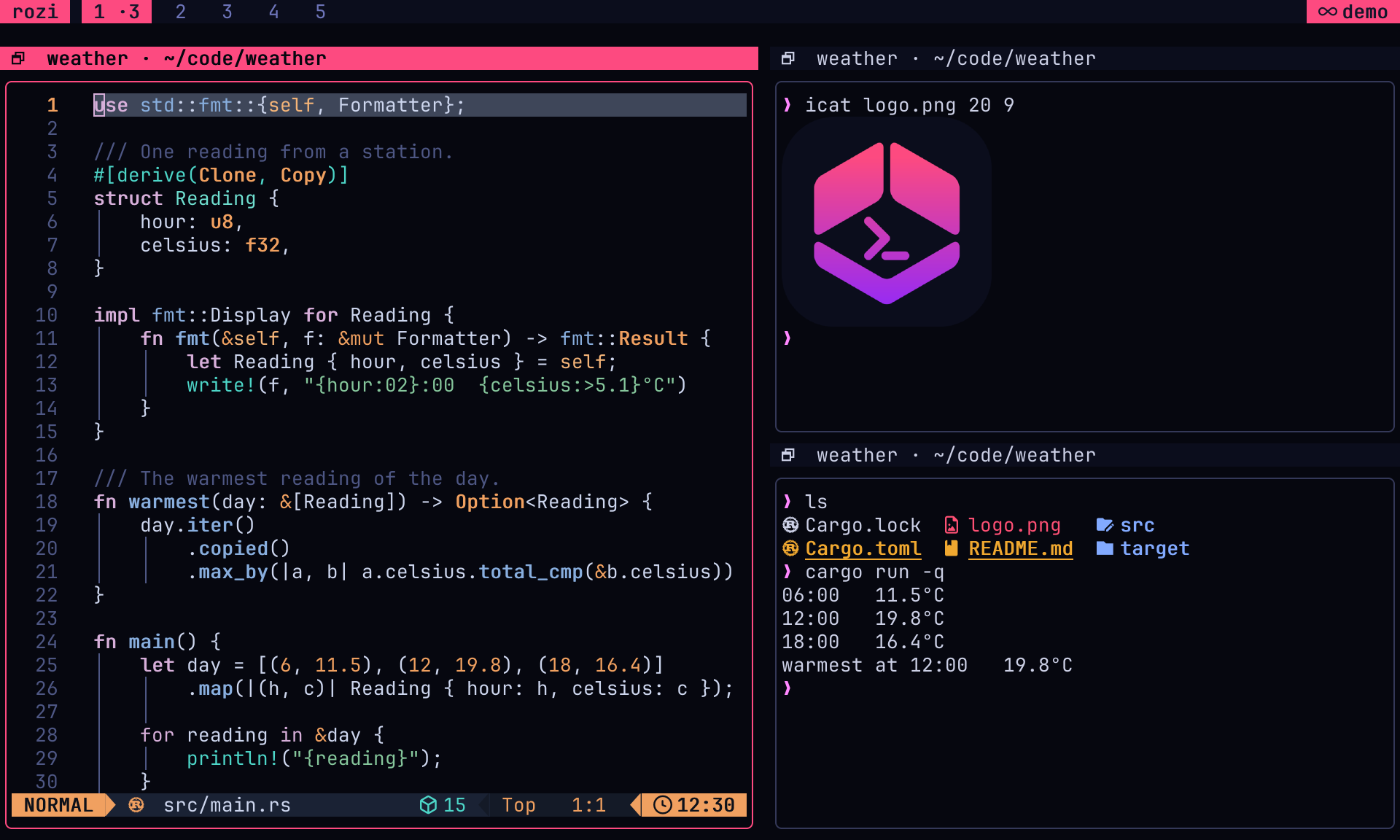
The image above is rozi capture-ui --render png --scale 2. capture-ui captures what the UI is showing: the bar, pane borders and titles, overlays and toasts, and every visible pane, at the size of the terminal rozi runs in. It takes the same --render, --scale, --image-pixels, --output, and --format options as capture-pane, with the same rules.
rozi capture-ui --render png --output ui.png
rozi capture-ui --render ansi --format text | less -R
rozi capture-ui --format json | jq -r .data.text
The capture is the next frame the UI draws. rozi draws it immediately for the request, so an idle UI answers too, and simultaneous requests share that frame. Colors match the screen: the theme's background and text colors fill cells a program left at its terminal defaults. Images in panes are included as for capture-pane, and anything drawn over one, such as an overlay or a floating pane, covers it in the capture as it does on screen. A dimmed backdrop behind a modal does not dim the image parts that remain visible.
capture-ui needs a UI; --session is refused because a session server draws nothing. Capture its panes one at a time with capture-pane instead. The reply reports the frame's width and height in cells alongside the capture.
To save a PNG by hand instead, use the Screenshot pane and Screenshot UI commands; see Take a screenshot.
Actions, status, and notifications
run-action accepts:
- built-in action IDs, such as
toggle-float - IDs from
[[commands]], such asbranches - extension command IDs, such as
git-tools.branches
Destructive actions honor [confirm].
status reports a short free-form value for a pane. working, blocked, done, and idle have built-in presentation. Values are limited to 64 characters and reasons to 256, after display-text sanitization. --target may come before or after the value, and is the only way to name a pane from a script that is not running inside one. The update is queued to the session server, so a successful reply does not guarantee that every client has drawn it yet.
Use notify for failures, and for successful results that would otherwise go unseen:
rozi notify "tests failed" --title Build --level errorSubscriptions
subscribe prints one JSON object per line until the endpoint closes:
rozi subscribe pane-exited pane-status-changed |
  jq -r 'select(.event == "pane-status-changed") | [.data.pane, .data.status] | @tsv'
Every event has event and data; event fields are under data. See Hooks for the event names and fields.
Pickers
In plain mode, pick reads one label per input line and prints the selected label:
branch=$(git branch --format='%(refname:short)' | rozi pick --title Branch) || exit 0
git switch -- "$branch"
Selection exits 0, cancellation exits 1, and a lost connection exits 2.
Use --json for stable row IDs, descriptions, groups, disabled or active rows, custom actions, prompts, empty-list text, tabs, and live updates. The first input line is picker metadata and may contain initial rows. Each later line replaces the complete row set.
{
  "title": "Branches",
  "rows": [
    { "id": "main", "label": "main", "active": true },
    { "id": "old", "label": "old", "disabled": "protected" }
  ]
}{"title":"Branches","rows":[{"id":"main","label":"main","active":true},{"id":"old","label":"old","disabled":"protected"}]}
JSON mode prints selection, cancellation, and action objects. An action without close: true keeps the picker open so the producer can send refreshed rows. empty is the text shown for an empty row list while the filter is empty; a filter that matches nothing always says No matches. prompt may be a title string or an object with title, placeholder, value, and masked.
Declare tabs to show several related lists in one picker. Each tab keeps its own rows, filter, and highlight; Tab/Shift+Tab or Right/Left switch between them. Row snapshots name their tab, and JSON mode prints {"tab":"…"} on each switch so the producer can load a tab when it is first shown:
{
  "title": "Git",
  "tabs": [
    { "id": "branches", "label": "Branches" },
    { "id": "worktrees", "label": "Worktrees" }
  ],
  "rows": [{ "id": "main", "label": "main" }]
}

{
  "tab": "worktrees",
  "rows": [{ "id": "/src/rozi-review", "label": "rozi-review" }]
}{"title":"Git","tabs":[{"id":"branches","label":"Branches"},{"id":"worktrees","label":"Worktrees"}],"rows":[{"id":"main","label":"main"}]}
{"tab":"worktrees","rows":[{"id":"/src/rozi-review","label":"rozi-review"}]}
Selections and actions from a tabbed picker carry the tab: {"selected":"main","tab":"branches"}. See Picker protocol.
Published activity
publish keeps a two-way stream open. Write complete row snapshots to stdin:
{"rows":[{"id":"job-1","title":"Run tests","status":"working","active":true}]}Read activation requests from stdout:
{"activate":"job-1"}An empty row list or a closed stream withdraws the rows. Use stable IDs. A process with ROZI_PANE publishes for that pane. A supervised service has no pane, so rozi uses the focused live pane when the stream opens. A stream opened by an extension closes when rozi reloads its configuration or disables the extension.
Published rows appear even when the pane has no detected agent. When a known agent publishes rows, rozi derives that agent's displayed state from the rows instead of from its screen.
See Published activity protocol and Sidebar.
Drive a detached session
--session <NAME> reaches the session server directly. Nothing has to be attached, and nothing becomes attached: the request is answered and the connection closes, so the session's client count and layout control are untouched and a script cannot make an empty session look occupied.
#!/bin/sh
# Start a build in a session nobody is looking at, then read the result back.
pane=$(rozi --session dev split 'cargo test' | jq -r '.data.id')
until rozi --session dev list-panes --format json |
  jq -e --argjson p "$pane" '.data[] | select(.id == $p and (.status | startswith("exited")))' \
  >/dev/null; do
  sleep 2
done
rozi --session dev capture-pane --target "$pane" --scrollback full --format text
The session must already exist. Start one with rozi sessions new dev, or leave a detached rozi dev running.
There is no general event stream from a session endpoint: subscribe reports UI events, which a server does not raise. Agent state is the exception: agents wait waits inside the server, without polling and without an attached UI.
Extensions and detached sessions
When ROZI_EXTENSION is set, the CLI marks every request as coming from that extension, stamped with a token the running UI renews on each config reload. The UI checks that token, so leftover processes from a disabled or reloaded extension stop being obeyed.
A session server cannot make that check, so it refuses such requests:
a session server cannot check whether extension `git-tools` is still active, and will not act on
its behalf; reach a running rozi instead, or clear ROZI_EXTENSION when the caller is not the
extension
An extension that wants to drive a session should go through a running UI. A person typing in a pane that an extension opened inherits ROZI_EXTENSION and hits the same refusal; run env -u ROZI_EXTENSION rozi --session … to make the request as yourself.
Session lifecycle
These commands manage sessions rather than control a UI:
rozi dev
rozi sessions attach dev
rozi sessions attach dev --read-only
rozi sessions new dev
rozi sessions new review --profile dev
rozi sessions new api --cwd ~/src/api
rozi sessions list
rozi sessions kill dev
sessions list and sessions kill also take --remote:
rozi sessions list --remote workbox
rozi sessions kill dev --remote workbox
To control a session on another machine, see Sessions on another machine. Git checkouts have their own rozi worktrees namespace; see Use worktrees from the command line.
See Sessions and Remote sessions.